
Switching monitor sources with BetterDisplay
I use multiple Macbook Pros during the work day. One is used exclusively for work and the other is my personal machine. I have a multiple monitor setup that I use. When the work day is over I shut off my work machine. So to avoid having one of my monitors going unused after work, I switch input sources. Sharing resources between the two is difficult since I only have admin access on my personal machine. I am not allowed to install software on my work machine without permission. Also these machines are not allowed to communicate with each other over the network. I want to be able to share a keyboard and mouse. I also want the ability to view the monitor of one machine while actively controlling the other.
List of requirements
- Share keyboard and mouse
- Share monitor over multiple input sources
- Ability to view screens for both machine while actively controlling the other.
List of restrictions
- Restrict access from one machine to the other
- Only have admin access on one machine (ability to install software without approval)
My monitor does have a built in KVM switch. Since I only plug my work machine into one of the monitors, I would lose the ability to view my work machine when I switched to my personal machine. So instead I am using an external USB switch. There is a handy little remote that I can place right next to my mouse. This solves switching the keyboard and mouse but not the video input source.
The monitor also has a menu button at the base which allows me to switch input sources. It is a bit annoying to use. The monitor is at the back of the desk just beyond easy reach. To use it, I have to lean forward. It isn't a deal killer just inconvenient. Also, it isn't just one button push. Pushing the button opens a menu and I have to select the correct input source from a list. This is pretty annoying. The BetterDisplay software comes to the rescue.
This software allows anyone using a recent version of MacOS the ability to control almost every aspect of their monitor. This includes brightness, audio, picture in picture, virtual monitors and switching input sources. I won't go into all of the cool stuff you can do here but it is impressive.
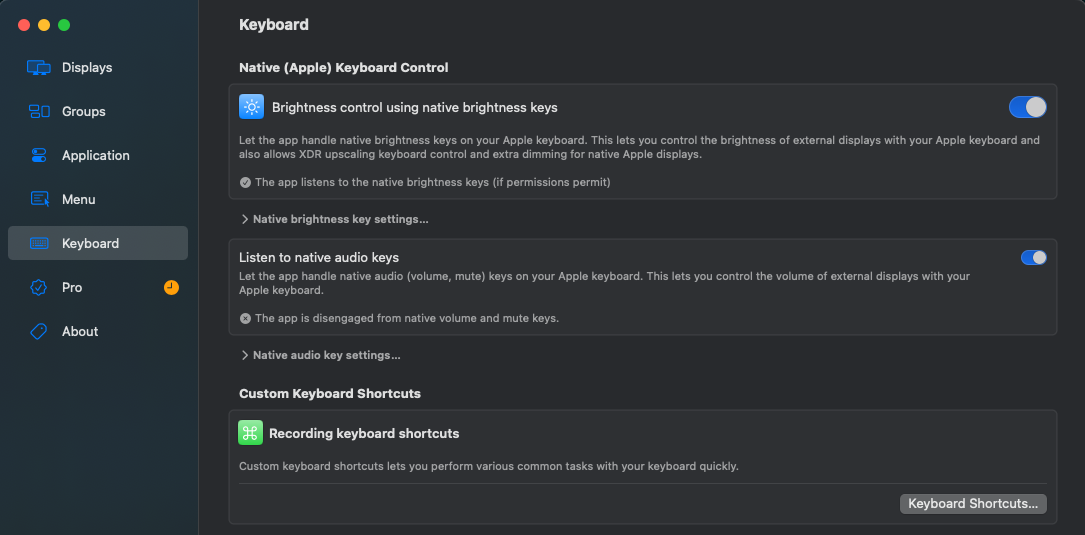
What I wanted to do was setup a MacOS hotkey which allows me to switch between input sources. This is built in. To set it up, I was able to do the following. Open the BetterDisplay software ⌘ + Space. Click on the Keyboard menu item. Under Custom Keyboard Shortcuts , there is a button named Keyboard Shortcuts. Scroll down until you find DDC Display Input Source. This allows you to select your monitor and the input source. Now just click into Record Shortcut and press the hotkey keys you want to use.

I did run into a couple of problems. First, the name of the input source in the list wasn't accurately named. On my monitor, I was using the USB-C source for one machine and a Display Port source for the other. The corresponding sources in the list that turned out to work were named DisplayPort1 for my USB-C source and DiplayPort2 for my Display Port source.
Figuring this out was a bit of trial and error. On the Mac Menu Bar, BetterDisplay has an icon that opens a menu when you click on it. This gives you a list of all of your monitors along with some actions you can perform. One of those is DDC Input Source. This lists a lot of input sources but it does not necessarily display them all at one time. There are several pages that you can scroll though. I clicked input sources one by one until I found the ones that worked.
The other issue I had isn't a problem that I think can be fixed by BetterDisplay. I have way too many monitors connected to my Macbook. The Macbook doesn't allow me to individually name them as far as I can tell. The name is set to "Monitor Brand" and then numbered 1 through however many i have. Since, all of my monitors are the same brand I get "Monitor Brand 1", "Monitor Brand 2" and so on. This would be fine except that the name doesn't persist past my machine going to sleep or restarting. "Monitor Brand 1" will be one monitor one day and a different one later. This also effects the display arrangement and the BetterDisplay hotkey for switching input sources.
This issue is a pain for me. When this happens, I have to update the BetterDisplay hotkey. Worse, when I switch sources from my personal machine over to the other machine, I typically want to move what is on the screen to a different monitor. This can be challenging since the name of the monitors is not consistent. However, the ability to change inputs source with a key stroke has been wonderful. Thank you BetterDisplay.